


Admin
Manage every aspect of your school's critical data.
Seamless solutions to help you integrate TASS with your school software ecosystem.
Stay in the loop with the latest updates on school management, education, IT and news from TASS.
Discover TASS with a quick quiz and see how it can help your school.
Explore how we protect your school’s data, including ISO 27001 certification and Australian data residency controls.
Discover how other schools use TASS to keep their operations running smoothly.
Catch up with the TASS team at the upcoming EdTech & school association events.
Reach out and collaborate with your fellow TASS schools.
Take a look at the resources from our 2019, 2023, and 2025 TASScon conferences.

As you close out 2026, consider the tasks your team has spent the year following up on repeatedly: a leave request awaiting approval, a payment requiring reconciliation, or a booking that needs another reminder. Reviewing those handovers can help you identify useful improvements before the 2027 school year; the kind that can turn a week-long fee statement into a single day.
We first dug into this in how workflows and automation can improve your school's processes, and the patterns it described are still painfully familiar: a timesheet left to go stale in an inbox, a requisition approved twice because nobody can see where the first approval landed, or a family resubmitting the same form because the original seems to have vanished into a shared inbox somewhere.
A school runs on dozens of these small handoffs at once, each passing through different hands, systems, and inboxes. Before you automate anything, map out the full journey of one piece of work from start to finish. Think of it like traffic flow:
This blog will show you how to clear those traffic jams for good: which processes to prioritise first, how other schools have evolved in how they work, and a practical, low-risk way to trial the change before the new year lands.
Start with the processes your team already knows off by heart – think of the recurring ones with clear owners and the same handovers each week. Ask where the work actually slows down, which details get entered twice, and how often someone has to chase a response that should have arrived days ago.
Pick a starting point small enough to test safely but visible enough for your team to feel the difference. The examples below cover administration, finance, and family communication; three areas where a single fix tends to ripple outward.
Leave and timesheet workflows are often where the back-and-forth starts, bouncing between employees, supervisors, and payroll staff before knowing who to go to for final approval. Review what's needed at submission, who approves it, and when an approved record needs to be ready for a pay run. If a team member is away, make sure another authorised person can step in, so one person's absence never becomes everybody else's bottleneck.
Purchasing is where a vague process costs the most, because everyone involved wants to know exactly where their request sits. Give your team a defined route from request to approval, and record the budget owner, the supporting information required, and the authorisation limits before you configure the sequence.
Clear records pay off well beyond the purchase itself: they're what makes audit preparation straightforward instead of a scramble. Review how your team will retrieve evidence of who requested, checked, and approved a transaction, long after everyone involved has forgotten the details.
Fee statements tend to swallow more time than anyone budgets for, especially if your team is still reconciling student and account information by hand before a single statement goes out.
A real example of what that looks like comes from Alphington Grammar School. By bringing student administration and finance into TASS, they were able to build a workflow that cut fee statement processing from at least one week down to approximately one day.
Payment schedules tackle a different problem, which is the stream of one-off questions from families about what's due and when. At Marist College Ashgrove, around 73% of their parent community have taken up a schedule through our integration with School EasyPay. Parents manage their own payment details through the Parent Portal, and the finance team gets far clearer visibility over fee processing.
Parent permissions, bookings, and reminders
Parent-focused workflows succeed or fail on one thing: whether a family knows exactly what to do next. A good place to start is reviewing excursion permissions, interview bookings, and activity registrations for duplicated messages or unclear completion statuses - the small hurdles that turn a simple form into three follow-up emails.
Keep parent communication relevant and genuinely easy to act on, rather than another notification to swipe past. Offer an accessible alternative for families who need support with digital channels, tailor who receives each message, and decide when they stop receiving reminders.
Every workflow you build is only as reliable as the data underneath it. An outdated contact, a duplicate family record, or the wrong approver assigned months ago can send a task to the wrong place, and nobody notices until a parent calls asking why they never heard back.
If you want to pilot a workflow, check the records it will actually use. A focused database review can surface missing details and stale entries you didn't know you had. Alphington Grammar School's story shows what this can look like in practice: sport, music, and their learning management system all feed back into TASS as the core system, so each department keeps the tools and processes it already knows. Map which system owns each record, what moves between systems, and who gets the call when a transfer fails.
For integration planning, read up on What a Modern API System Means for Schools before building anything. Confirm which operations are supported and available for your proposed connection; it’s best not to work on the presumption that every capability described is already switched on.
Automation should move work faster, not move people out of the loop. Keep people accountable for approvals, sensitive decisions, and exceptions, and make sure your workflow keeps those responsibilities visible, with a clear way to pause or correct a task before it goes wrong.
Marist College Ashgrove's case study is a good example of where that line sits. Their finance team adjusts payment arrangements for families going through financial distress, a judgement call only a person should make. The system's job is simply to coordinate what happens next once that human decision has been made.
If you bring AI into any of this, carefully assess what it can access and what it produces separately from the rest of your workflow. The Office of the Australian Information Commissioner's AI privacy guidance recommends keeping a person firmly in the loop, and keeping personal or sensitive information out of publicly available generative AI tools altogether.
Document permitted uses, review responsibilities, and escalation procedures clearly enough that a new staff member could follow them. Student welfare, custody matters, and financial hardship will always call for proper professional judgement, not a workflow.
Pick one contained process, give it an owner, a test plan, and a firm review date. You can schedule this around your team's year-end commitments once the term has wrapped up.
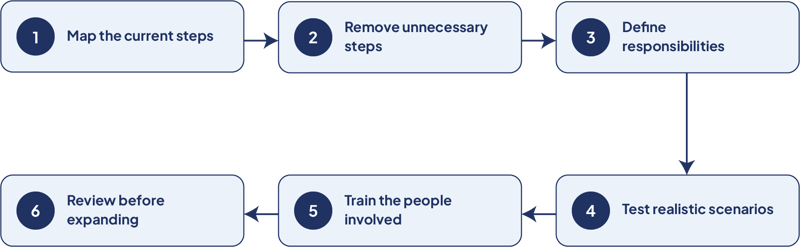
Measure the new workflow against where you started, using figures your team can collect consistently every time.
Agree on what success looks like before the pilot begins, not after. A faster process is only a win if it still preserves the right approvals and produces records you can trust.
A good first improvement clears one traffic jam for good and gives your team a clear route through a recurring task, with fewer avoidable handovers, and a visible owner when something needs attention. Choose one process, establish where it stands today, and test the change with your team who will live with it daily. After that, those results should help guide you to decide what to improve next.
TASS brings finance, student administration, and payroll together under one roof, giving your school a solid foundation to build that map on, instead of another system to reconcile. Get in touch with our team today, and let's get your school ready for next year.